
Skip to content

Unlock the Power of Your AgentDealer & HubSpot Integration

Transform disconnected systems into one connected revenue engine. Capture leads, qualify prospects, automate sales workflows, and measure marketing's impact—all through a seamless integration between HubSpot, Salesforce, and AgentDealer. 

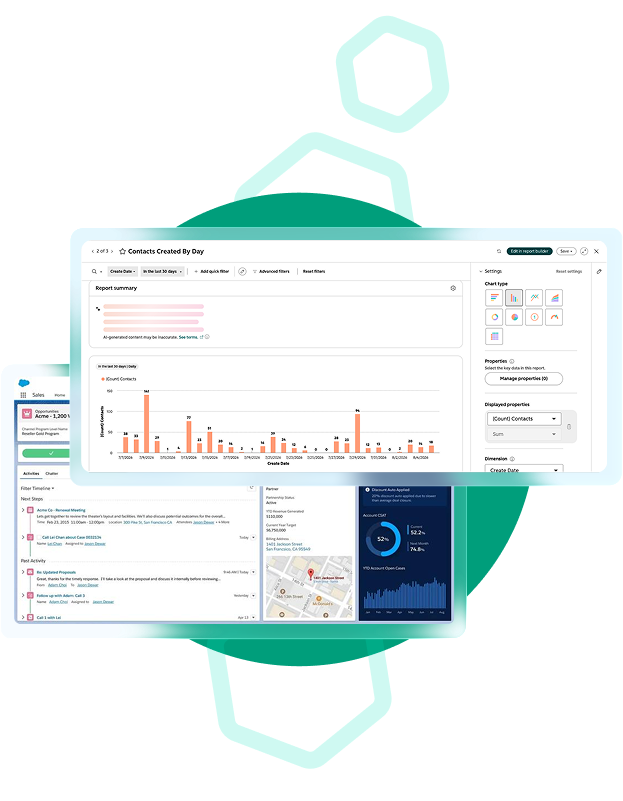
A HubSpot and a Salesforce Screenshot

Connected Customer Journey

Your website, CRM, and sales platform should work together—not in silos. With the Provisions Group integration strategy, every lead captured in HubSpot automatically begins a connected journey across Salesforce and AgentDealer. From the moment a prospect submits a form, your systems begin working together to:

  • Create and enrich contact records
  • Identify existing customers and eliminate duplicates
  • Assign leads to the correct sales representative
  • Trigger automated marketing and sales workflows
  • Track revenue attribution from first touch to closed deal
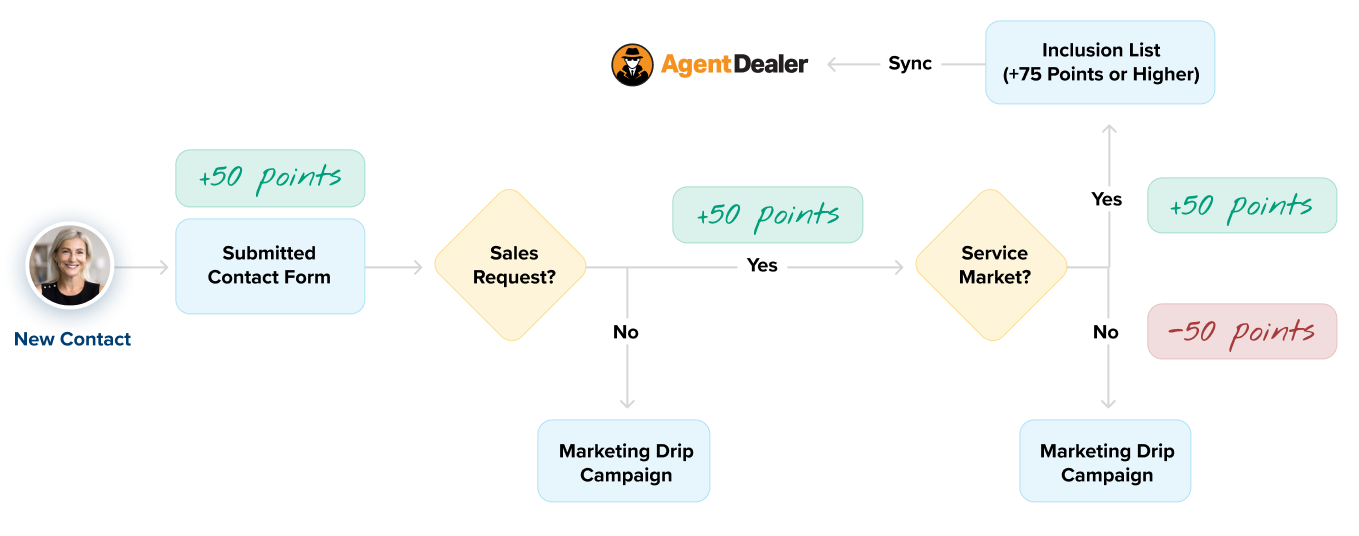
HubSpot Contact Scoring diagram showing a new contact submitting a form and earning 50 points. Then it shows if they select no for a sales request, they get a marketing drip campaign. If they select yes, they earn another 50 points and continue to the path of syncing with Agentdealer.
An infographic showing contacts within a CRM and referencing lead status, lifecycle stage, and last contacted data.
CAPTURE BETTER LEADS

Every Form Submission Starts a Smarter Process

Whether your website is built on WordPress or another platform, HubSpot forms capture more than contact information.

Each submission can automatically:

  • Create or update a HubSpot contact
  • Track website activity and engagement
  • Capture marketing interactions and lead history
  • Trigger automated follow-up workflows
  • Identify and prepare qualified leads for Salesforce

By the time a lead reaches your sales team, they already have valuable context about who the prospect is, what they’re interested in, and how they’ve engaged, making the first conversation more informed and effective.

How HubSpot Can Support AgentDealer

HubSpot and Salesforce
INTELLIGENT LEAD QUALIFICATION
Send Sales Better Opportunities
Not every inquiry belongs in your sales pipeline. HubSpot scores leads based on engagement, website activity, demographics, and buying signals to identify your best opportunities. When a lead reaches your qualification threshold, it's automatically synchronized with Salesforce and AgentDealer, ensuring your sales team focuses on prospects most likely to convert.
A high level example of a CRM customer profile
SMARTER ACCOUNT MANAGING
Intelligent Company Managing
Before creating a new opportunity, the integration checks Salesforce for existing businesses using intelligent company matching, email domains, and business information.If an account already exists, the contact is linked to the existing account, the current account owner remains assignedand duplicate companies are avoided.If no match exists, a new account is created automatically.
Man reviewing Salesforce screens
AUTOMATED LEAD ROUTING
Get Every Lead to the Right Person
Lead assignment doesn't have to be manual. Using Salesforce automation and territory logic, new opportunities are automatically routed to the appropriate inside sales representative, territory manager, or regional sales rep based on your business rules. The result is faster response times and a more consistent sales process.
CLOSED LOOP REPORTING
Connect Marketing to Revenue
As opportunities are created and updated in AgentDealer, deal information is synchronized back into HubSpot. This creates a complete view of the customer journey—from the first website visit through closed business—allowing your team to measure campaign ROI, understand marketing attribution, track pipeline performance, improve future marketing decisions. No spreadsheets. No manual reporting.
MARKETING AUTOMATION
Highly Personalized Marketing
With Salesforce and AgentDealer data flowing into HubSpot, you can deliver highly personalized marketing based on customer interests, products, industries, and sales activity such as industry-specific email campaigns, product-based nurture tracks, customer onboarding,sales follow-up sequences, renewal and retention campaigns, every communication becomes more timely, relevant, and effective.

Why Choose Provisions Group

Technology is only part of the solution. Our team combines HubSpot expertise, Salesforce integration experience, RevOps strategy, and technical implementation to help organizations build connected systems that improve efficiency, increase lead quality, and drive measurable revenue growth.

ProvisionsGroup-AllHands-2024

Frequently Asked Questions

How do I prevent bad leads from getting assigned to Sales?

We can customize your HubSpot lead scoring to identify which leads are truly sales-ready. By combining engagement signals like form submissions, email activity, and website behavior with Ideal Customer Profile (ICP) criteria like company size, industry, or location, we can ensure only qualified leads are routed to your sales team.

This keeps low-quality leads in marketing nurture while helping Sales focus on the opportunities most likely to convert.

How can I ensure that inbound Leads are correctly distributed to Sales?

Our process works with your existing territory rules or the AgentDealer Territory Manager to ensure inbound leads are routed to the right sales team quickly and accurately.

Whether your territories are defined by ZIP code, state, industry, account type, or more complex criteria, we’ll tailor the routing process to fit your organization. And as territories, teams, and assignments change, the process can adapt with them, keeping lead distribution accurate and scalable.

How do I ensure that HubSpot & AgentDealer are syncing correctly & as efficiently as possible? In addition to being HubSpot experts, we have deep Salesforce expertise, specifically with AgentDealer. We can optimize the integration between both platforms to ensure the right data syncs at the right time, records are matched correctly, and leads are routed without unnecessary delays or manual work.